 FreeGenVideo
TEXT TO VIDEO · LIFESTYLE PORTRAIT
A quiet moment in soft daylight
A woman beside a sunlit window turns toward the camera and smiles. Warm ivory interiors, natural skin texture and a slow cinematic push-in.
NO SIGN-UP. NO LOGIN. JUST CREATE.
Use our free AI video generator to turn text prompts and images into AI videos. Create online with no sign-up, no login and no app to install.
Describe a scene or upload a start frame. Play and download your video here.
Available output options depend on the current video model. Check the options shown in the generator before you start.
FROM WORDS OR IMAGES. INTO MOTION.
Describe a scene and the way it moves, or start from an image you already have. Explore text-to-video prompts and image-to-video ideas below.
TEXT TO VIDEO · LIFESTYLE PORTRAIT
A woman beside a sunlit window turns toward the camera and smiles. Warm ivory interiors, natural skin texture and a slow cinematic push-in.
TEXT TO VIDEO · PRODUCT SHOT
Golden light moves across an amber perfume bottle, blood orange and travertine as the camera makes a gentle orbit. A warm, tactile product shot.
TEXT TO VIDEO · STORYBOOK ANIMATION
A fox in a yellow raincoat waters a seedling in a rainy greenhouse. Gentle character motion, layered gouache textures and warm amber light.
IMAGE TO VIDEO
Start from a photo, a render or a sketch, then describe the motion you want. Choose an example to fill in its starting image and prompt, then make it your own in the generator above.
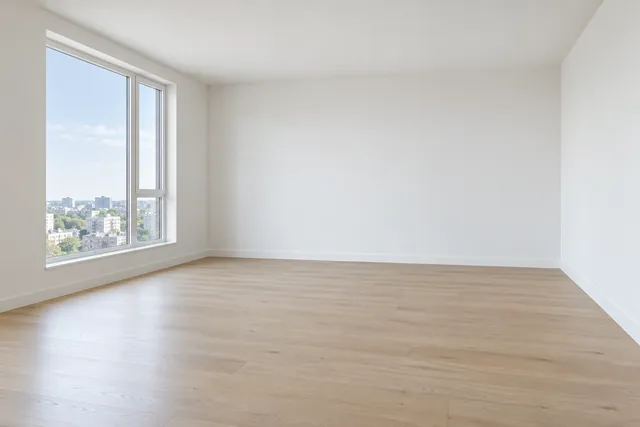
IMAGE TO VIDEO · ROOM MAKEOVER
An empty room becomes a cozy living space with a green sofa, cream rug, wooden table and plant. Soft daylight and a slow camera push-in.
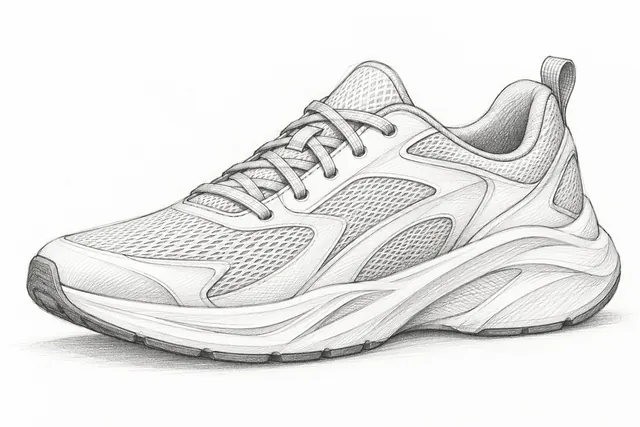
IMAGE TO VIDEO · SKETCH TO PRODUCT
Pencil lines become lavender mesh, mint accents and a cream sole. The finished sneaker turns slightly for a clean studio product reveal.
These example clips were generated with Seedance 2.0. Play each video to see the motion; the covers are frames from the actual results. Results vary with the prompt, reference image and model.
FROM IDEA TO VIDEO
No filming or editing experience needed. Start with a sentence, or with an image you already have.
Tell the AI who or what is in the shot, what happens and how the camera moves. You can also start with one of the example prompts above.
For image to video, upload a photo or illustration as the starting point. For text to video, your prompt is enough. Then start generating.
Watch the result and save it to your device. Want a different take? Change the action or camera movement in your prompt for your next video.
A CLEARER PROMPT. A BETTER SHOT.
A video prompt needs one thing an image prompt does not: motion. Describe what happens in the scene and how the camera moves, with a few specific details instead of a list of vague adjectives.
Keep to one main action per clip. Instead of “a woman in her room,” try “a woman in a bright white room turns toward the camera and smiles, soft daylight, slow push-in.” Change one detail at a time to explore the result.
A woman beside a sunlit window turns toward the camera and smiles. Warm ivory interiors, natural skin texture and a slow cinematic push-in.
MADE FOR YOUR NEXT IDEA
Use a free AI video generator to try an idea in motion before you plan a shoot or an edit.
Make a short scene for a post, a moving background for a presentation or a visual for your blog. Describe the mood and leave room for your own captions.
Bring characters, places and moments to life. Try a storybook animation, a cinematic shot or an illustration that starts to move before you settle on a direction.
Test a product reveal, a lighting change or a camera move around a fictional product. Use it as a concept to develop, then check the details before publishing.
GOOD QUESTIONS
Free video allowance, reset times, prompts, privacy and using your results.
An idea is enough to begin. Create a free AI video online, no sign-up required.